

Real estate ERP migration should preserve the business relationships that define what was sold, what the customer must pay, what has been collected, and what finance must recognize. Define the approved scope first, map business meaning rather than table names, rehearse the conversion, and validate customer, installment, payment, cheque, and accounting chains before cutover.
Real estate ERP data migration often begins only after a developer has operated for years on its core system. During that time, projects, buildings, units, reservations, contracts, amendments, payment schedules, receipts, cheques, broker records, customer statements, service requests, and accounting entries accumulate across software, spreadsheets, local databases, and paper files.
The migration question is therefore not simply, “Can we import the old records?” The real question is whether the new environment can continue to explain each customer obligation and financial balance after the old system is retired. A successful migration makes that history usable. An unsuccessful one may preserve thousands of records while breaking the relationships people need to run the business.
For the wider operating context, see Archer Solutions’ Real Estate ERP approach for property developers. This guide focuses specifically on historical data migration rather than the complete ERP scope.
Which migration route does the project require?
Three different activities are often described as “migration,” but they require different controls:
- Native version upgrade: converting an existing Odoo database from an older release to a newer supported release. Odoo recommends testing an upgraded database before production and notes that custom modules must be compatible with the target version. Review Odoo’s official database-upgrade guidance.
- Structured import: loading a bounded, sufficiently clean dataset through standard import tools. Odoo’s guidance highlights the importance of stable External IDs when imported records may later be updated. See Odoo’s official import documentation.
- Business-semantic migration: reconstructing customers, contracts, installments, payments, accounting, and operational relationships when sources are incomplete, inconsistent, or originate in another system.
The correct real estate ERP data migration route depends on source condition, version gap, customizations, business scope, and the evidence required for acceptance. A native upgrade may be one technical component, but it does not replace the work needed to reconcile business meaning.
Why is real estate ERP data migration unusually difficult?
Real estate transactions create long-lived obligations. A unit may be reserved, contracted, rescheduled, transferred, cancelled, refunded, or handed over across several years. Its customer account may contain installments, partial payments, cheque replacements, late changes, credit balances, and accounting entries created under different operating practices.
Those records are not independent. A payment is meaningful because it is allocated to an obligation. An installment is meaningful because it belongs to a valid contract. A contract is meaningful because it links the correct customer to the correct unit, company, project, price, and approved terms. If one link is lost, a technically successful import can still produce an unusable customer statement.
In Egypt and other installment-led real estate markets, the difficulty can increase when developers operate several legal companies and projects while managing long payment schedules, post-dated cheques, rescheduling, brokerage, After Sales, and Handover. These conditions do not make every migration identical, but they make relationship and financial validation especially important.
Legacy sources describe the same business in different ways
Older systems may use internal codes that no longer match current project or customer names. Spreadsheets may contain manual adjustments that were never written back to the source application. Paper documents may be the only evidence of an amendment. Accounting systems may summarize balances differently from the commercial system.
Migration must reconcile these meanings. Copying a column named “customer” into another field named “customer” is not enough when duplicates, inactive records, shared family names, company boundaries, and changed identifiers are present.
Historical inconsistency becomes a current operating risk
A mismatch that was tolerated in a spreadsheet becomes more visible once an ERP generates customer statements, collection forecasts, journal entries, approvals, and follow-up activities from the same data. Migration is the point at which the organization must decide which source is authoritative, how exceptions will be treated, and which historical differences require business approval.
What should be included in the migration scope?
The first migration workshop should define the business decisions the new system must support on day one. For most sales-led real estate environments, the governed core is the commercial-to-financial chain. Construction, procurement, and project-cost history may also be relevant for developer-led organizations, but they should be included only when they are part of the confirmed ERP scope.
| Data group | Relationships that must survive | Typical validation question |
|---|---|---|
| Property structure Companies, projects, phases, buildings, and units |
Ownership, hierarchy, availability, status, and analytic dimensions | Does every migrated unit belong to the correct legal and project structure? |
| Customer and contract Customers, reservations, contracts, and amendments |
Customer identity, unit, price, dates, terms, status, and transfer history | Can the system explain the active agreement and its approved changes? |
| Installments and collections Schedules, receipts, payments, cheques, and allocations |
Obligation, due date, paid amount, allocation, replacement, and outstanding balance | Does the customer statement reconcile to the approved commercial history? |
| Finance Invoices, journal entries, banks, and reconciliations |
Company, account, partner, analytic reference, payment, and reconciliation | Are accounting moves balanced and linked to the underlying transaction? |
| Service history After Sales, Handover, and Customer Experience |
Customer, contract, unit, request, milestone, and responsible team | Can service teams continue the customer journey without rebuilding context? |
Include what must remain operational, not everything that exists
Attachments, system chatter, obsolete configuration, unused CRM history, duplicated contacts, and expired technical records can increase complexity without improving continuity. They may be archived outside the operational database when legal, audit, and access requirements allow it.
The correct boundary is organization-specific. It should be approved by commercial, collection, finance, customer-service, legal, and technology owners—not decided only by the implementation team. The agreed boundary should name both inclusions and exclusions so that nobody assumes “full history” means every file and every technical log.
Scope test: If removing a record prevents the organization from explaining a customer obligation, a collection position, an accounting balance, or a required service action, it probably belongs in the governed migration scope.
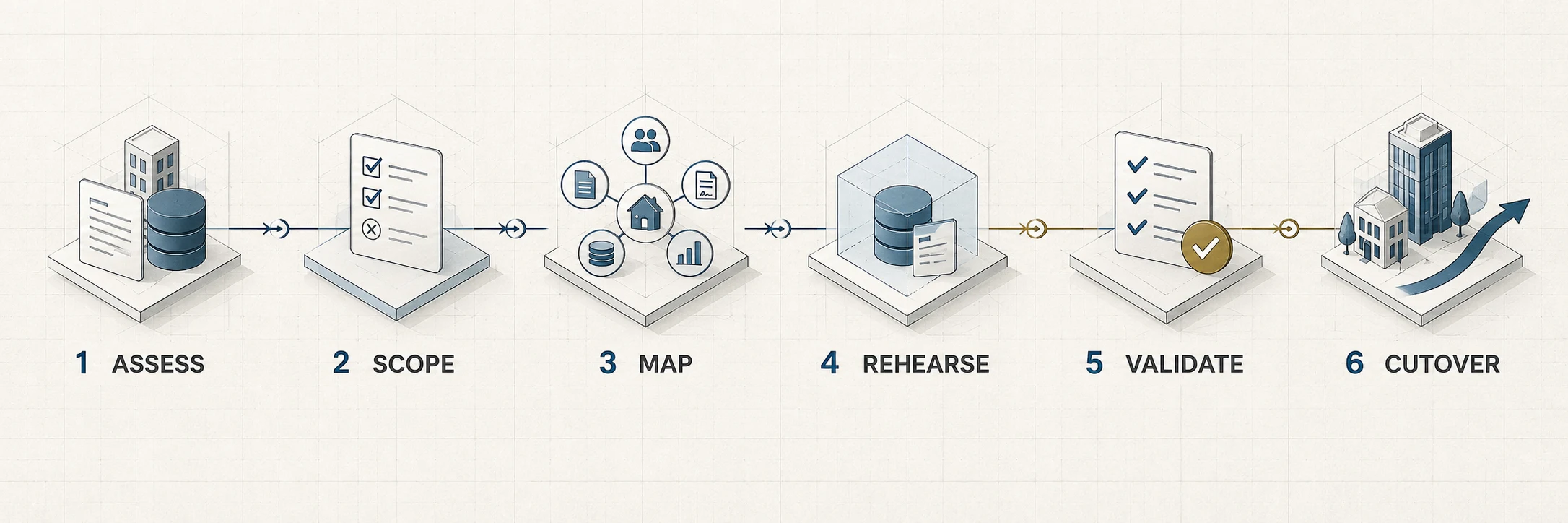
A six-stage governed migration method
A controlled migration is a sequence of business and technical decisions. It is not merely an import task. Archer’s broader ERP implementation approach places migration inside a governed delivery program; the six stages below focus on the historical-data path.
1. Assess the source condition
Identify every source system, database, spreadsheet, document archive, integration, and manual process that may contain required history. Profile completeness, duplicates, invalid references, inconsistent dates, unbalanced values, missing identifiers, and differences between commercial and financial totals. The assessment should also reveal whether the source is operational, partially documented, or limited to technical evidence.
2. Scope the required operating history
Define legal companies, projects, date boundaries, business domains, owners, exclusions, acceptance criteria, and cutover constraints. Separate historical conversion from desired process redesign wherever possible. Combining every workflow improvement with migration makes it harder to isolate defects and approve the result.
3. Map business meaning to the target
A semantic map explains what each legacy object means and how it participates in the operating lifecycle. For example, a legacy “payment” may represent a receipt, a cheque, an allocation, or an accounting posting. Those meanings may belong in separate target objects even if they occupied one legacy table.
Transformations should be controlled, repeatable, and reviewable. Duplicate handling, identifier matching, date conversion, rounding treatment, status mapping, and company assignment require explicit rules. Material exceptions need named business owners and an auditable disposition. Cleaning is not permission to rewrite business history merely to make the target accept it.
4. Rehearse in a clean, representative environment
A rehearsal loads the complete approved dataset into a safe target, runs automated controls, and lets business teams inspect customer statements and operational scenarios. The team should be able to repeat the conversion from a clean target. A process that works only after undocumented manual repair is not a dependable cutover method.
5. Validate structure, finance, operations, and scope
Validation must establish more than record counts. It should prove that required relationships exist, financial totals reconcile, accounting entries are balanced, customer histories remain understandable, and excluded records did not leak into the target. Business users must test the outputs they will actually rely on.
6. Cut over only after business acceptance
The cutover plan controls the final source freeze, delta extraction, import order, validation, approval, user access, rollback decision, and opening support period. Go-live should follow evidence-based acceptance, not pressure from the calendar.
How should migrated real estate data be validated?
Validation should answer four distinct questions:
- Structural integrity: Are identifiers unique, parent-child records complete, and contracts linked to valid customers, units, schedules, payments, and cheques?
- Financial integrity: Do balances reconcile, accounting entries remain balanced, and allocations, payments, cheques, and reconciliations retain their approved treatment?
- Operational continuity: Can users produce a customer statement, review outstanding installments, trace a receipt, identify unit status, and continue approved service activity?
- Scope integrity: Are approved inclusions complete, defined exclusions absent, and unsupported workflows clearly outside the delivered boundary?
Automated tests provide breadth, but business acceptance provides meaning. Finance should inspect reconciliations and balances. Commercial and collection teams should test active customer journeys. Customer-service teams should confirm that the history required for After Sales or Handover remains understandable. Technology should confirm repeatability, performance, access control, and the final cutover sequence.
What belongs in a migration acceptance pack?
- Approved scope, source list, date boundary, and exclusion register.
- Record counts by company, project, object, and status where meaningful.
- Relationship checks for the customer–unit–contract–installment–payment chain.
- Financial totals, balanced-entry controls, allocations, and reconciliation evidence.
- Sample customer statements and end-to-end operational scenarios.
- Exception log with owner, decision, treatment, and approval.
- Rehearsal results, final cutover results, and named business acceptance.
What does published real estate delivery evidence show?
The following Archer Solutions case studies illustrate different migration conditions. They are not universal promises. Each describes a specific client, source condition, scope, and delivery result.
New Jersey Developments: an extreme recovery scenario
Most migrations begin with an operating source system and accessible implementation knowledge. New Jersey Developments presented a substantially more difficult condition: a non-operational Odoo 14 environment, incomplete source code, and a final database dump without a complete functional handover.
Archer Solutions reconstructed the relationships connecting companies, projects, units, customers, contracts, installments, payments, cheques, and accounting before performing a business-semantic conversion into Odoo 18. The approved public case records 1,710 units, 39,015 installments, and 49,606 payments, with independent validation closing at 282 passes, no warnings, and no blockers. NJD is not a normal migration baseline; it demonstrates additional controls that may be required when the source environment is incomplete or no longer dependable.
Review the Odoo 14-to-18 recovery for New Jersey Developments.
El Nasr Housing & Development: long-lived historical records
El Nasr’s transformation replaced local software, spreadsheets, and paper-based processes with an on-premise Odoo 15 environment for 150 users. Because approximately 40 years of payment, customer, property, project, and financial history could not be exported reliably, the work used direct database access and controlled data-science techniques to recognize, reconstruct, clean, validate, and migrate the required records.
See how El Nasr’s historical data was modernized.
Reach Real Estate: API-based scripted migration
Reach’s multinational Odoo 18 program required a more technical migration route than the usual Excel extraction-and-upload cycle. Archer built a purpose-designed migration script using APIs to move historical records into the governed environment. The program transferred approximately 200,000 historical leads from the group’s marketing platform and migrated units, contracts, payments, and wider operational records for 175 users across eight country operations.
Read the Reach Real Estate implementation case study.
Questions to ask before approving a migration
Buyers should expect precise answers to these questions before treating a migration plan as implementation-ready:
Migration planning is also a useful test of an implementation partner’s architecture, governance, and delivery evidence. For a broader selection framework, use Archer Solutions’ 10-point real estate ERP implementation partner evaluation matrix.
- What must the new system explain on day one? Name the customer, collection, financial, service, and management decisions that depend on history.
- Which source is authoritative when systems disagree? Define ownership and escalation instead of allowing the technical team to guess.
- How will business meaning be reconstructed? Ask for mappings of statuses, relationships, allocations, amendments, and company boundaries—not only a field list.
- Which records are deliberately excluded? A clear exclusion register is evidence of scope control, not a sign of incomplete work.
- Can the migration be repeated from a clean target? Repeatability reduces manual fixes and makes final cutover more dependable.
- Which automated and business controls determine acceptance? Counts, relationships, balances, statements, scenarios, and named approvals should all be visible.
- What happens if final validation fails? The cutover plan should define rollback, decision authority, communications, and the next safe window.
Warning signs: Be cautious when a proposal promises to “migrate everything,” measures success only by row counts, has no exclusion register, leaves acceptance entirely to IT, or schedules go-live before a complete rehearsal.
Migration succeeds when the business can trust the history
Years of real estate data can be moved safely when scope, meaning, relationships, validation, and acceptance are treated as one controlled program. Preserve the records that explain customer obligations and financial truth, archive what does not belong in the operating system, and refuse cutover until the complete commercial-to-financial chain works in the target environment.
To compare the evidence behind different implementation conditions, browse Archer Solutions’ published ERP case studies. If you are defining the source boundary, validation controls, or cutover plan for an upcoming project, discuss your real estate ERP migration with Archer Solutions.